Blog
QxViewers - The first steps towards a UFaceKit-Webport
I've talked a lot (1,2,3,4) lately about my progress on QxWT towards release 1.0.0.2. Now that all the codeing is done more or less I can restart working on my master plan: Single APIing for Web and Desktop programing use Eclipse Libraries like Eclipse Databinding - In short UFaceKit Having completed the SWT-Port more or less since some time, having portotype implementations for Qt and Swing (to check if the concept can be transfer easily to other Desktop-UI-Frameworks) the missing thing is a port for a Web-UI-Framework. The problem is in the Web/GWT-UI space that GWT itself comes with a very restricted UI library missing important things like Table/TreeTables for example and one needs an external framework. I couldn't find a framework that fully satisfied my needs (most important a clear, reliable license scheme allowing me to use it in commercial applications) so I started my work on QxWT and now that this framework enters in a stable phase I can once more shift sources back to UFaceKit. To get to a first UFaceKit-Webport I have the following workitems:
- Done: Eclipse Databinding 3.5.2 for GWT - (no builds until Eclipse 3.5.2 itself is declared)
- In progress: UFaceKit-Viewers for QxWT-Structured-Controls - this gives automagically support for ufacekit-viewers-databinding because UFaceKit-Viewers are split in generic and widget-toolkit parts and ufacekit-viewers-databinding only talks to the generic part
- Not started: UFaceKit-Wrapper for QxWT - the thoughest thing might be to write write the native layouts
As the blog title suggests I've made good progress today and I can show off the first demo results from this work. The implementations are not finished yet but for people who are familiar with JFace-Viewers lines like the following might look familiar (beside the obvious Java5 features of UFaceKit-Viewers):
/**
 * Combo Viewer Setup
 */
ComboViewer<Person, Collection<Person>> viewer = new ComboViewer<Person, Collection<Person>>();
viewer.setContentProvider(new CollectionContentProvider<Person>());
viewer.setLabelConverter(new LabelConverter<Person>() {
  @Override
  public String getText(Person element) {
    return element.getFirstname() + ", " + element.getLastname();
  }
});

Collection<Person> ps = new ArrayList<Person>();
for (int i = 0; i < 300; i++) {
  ps.add(new Person("First " + i, "Last" + i, i));
}
viewer.setInput(ps);

/**
 * TableViewerSetup
 */
TableViewer<Person, Collection<Person>> tableViewer = new TableViewer<Person, Collection<Person>>();
tableViewer.setContentProvider(new CollectionContentProvider<Person>());

TableViewerColumn<Person> col = new TableViewerColumn<Person>(tableViewer, "Firstname");
col.setLabelConverter(new LabelConverter<Person>() {
  @Override
  public String getText(Person element) {
    return element.getFirstname();
  }
});

// ...
Collection<Person> ps = new ArrayList<Person>();
for (int i = 0; i < 300; i++) {
  ps.add(new Person("First " + i, "Last" + i, i));
}
tableViewer.setInput(ps);

/**
 * TreeViewer setup
 */
TreeViewer<Person, Collection<Person>> viewer = new TreeViewer<Person, Collection<Person>>();
viewer.setLabelConverter(new LabelConverter<Person>() {
  @Override
  public String getText(Person element) {
    return element.getLastname() + ", " + element.getFirstname() + " ("+ element.getAge() + " years)";
  }
});

viewer.setContentProvider(new ITreeContentProvider<Person, Collection<Person>>() {
  public Collection<Person> getChildren(Person parentElement) {
    return parentElement.getChildren();
  }

  public Person getParent(Person element) {
    return element.getParent();
  }

  public boolean hasChildren(Person element) {
    return element.getChildren().size() > 0;
  }

  public void dispose() {
  }

  public Collection<Person> getElements(Collection<Person> inputElement) {
    return inputElement;
  }

  public void inputChanged(IViewer<Person> viewer, Collection<Person> oldInput, Collection<Person> newInput) {
  }
});
viewer.setInput(setupData());
The widgets look like this: 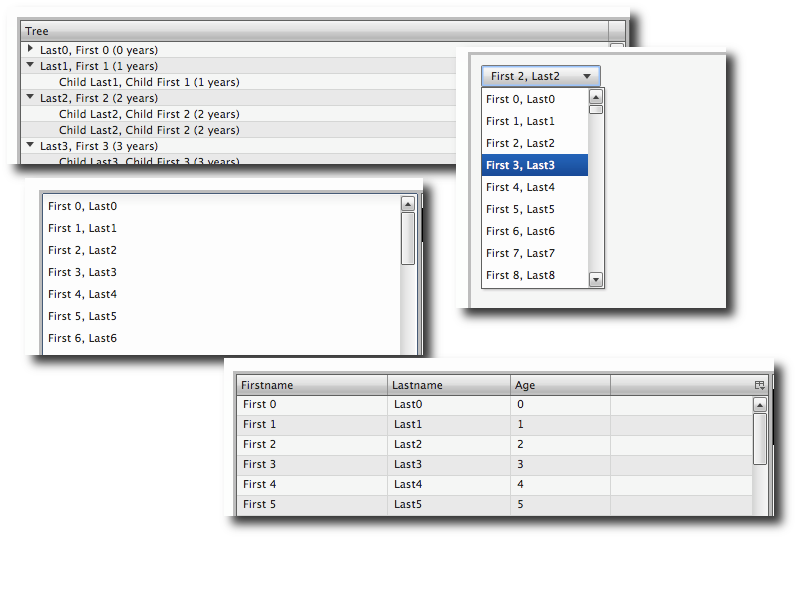 I'd like to point out once more that UFaceKit is structured in a way that you can use all parts independently from each other. So if you are in need to a Databinding-Framework for GWT and a light weight Domain-Technology like UBean then you can use them, you only need Java5 ready viewers for SWT and Databinding integration, ... all of them are useable standalone with minimal dependencies. Beside that I'm still struggeling with setting up a build for the SWT-Port on the Eclipse-Servers so that people can start consume stuff from there but that's a problem many small project suffer.