Blog
Enhanced RCP: How views can communicate
I've often seen the question in the eclipse newsgroups when it comes to view communication. People often face the problem that their views have to communicate with each other informing about state changes (selection changes are published best through ISelectionService). It looks like many people are not familiar with the OSGi-EventAdmin-Service which is a generic Event-System using the publish and subscribe pattern and it can be used really easy in your RCP-Applications.
1. Setup
Add org.eclipse.osgi.services to your MANIFEST.MF and make sure org.eclipse.equinox.event is part of your Launch-Config and Product-Definition.
2. Sending events
public class SenderView extends ViewPart {
  public static final String ID = "viewcommunication.views.SenderView";
  private Button b;

  public void createPartControl(Composite parent) {
    parent.setLayout(new GridLayout());
    b = new Button(parent, SWT.PUSH);
    b.setText("Send Event");
    b.addSelectionListener(new SelectionAdapter() {
      @Override
      public void widgetSelected(SelectionEvent e) {
        BundleContext ctx = FrameworkUtil.getBundle(SenderView.class).getBundleContext();
        ServiceReference<EventAdmin> ref = ctx.getServiceReference(EventAdmin.class);
        EventAdmin eventAdmin = ctx.getService(ref);
        Map<String,Object> properties = new HashMap<String, Object>();
        properties.put("DATA", new Date());

        Event event = new Event("viewcommunication/syncEvent", properties);
        eventAdmin.sendEvent(event);

        event = new Event("viewcommunication/asyncEvent", properties);
        eventAdmin.postEvent(event);
      }
    });
  }

  public void setFocus() {
    b.setFocus();
  }
}
3. Receiving Events
public class ReceiverView extends ViewPart {
  private TableViewer viewer;

  @Override
  public void createPartControl(final Composite parent) {
    parent.setLayout(new FillLayout());
    viewer = new TableViewer(parent);
    viewer.getTable().setHeaderVisible(true);
    viewer.getTable().setLinesVisible(true);
    viewer.setLabelProvider(new ColumnLabelProvider() {
      @Override
      public String getText(Object element) {
        return DateFormat.getDateTimeInstance().format(element);
      }
    });

    BundleContext ctx = FrameworkUtil.getBundle(ReceiverView.class).getBundleContext();
    EventHandler handler = new EventHandler() {
      public void handleEvent(final Event event) {
        if( parent.getDisplay().getThread() == Thread.currentThread() ) {
          viewer.add(event.getProperty("DATA"));
        } else {
          parent.getDisplay().syncExec(new Runnable() {
            public void run() {
              viewer.add(event.getProperty("DATA"));
            }
          });
        }
      }
    };

    Dictionary<String,String> properties = new Hashtable<String, String>();
    properties.put(EventConstants.EVENT_TOPIC, "viewcommunication/*");
    ctx.registerService(EventHandler.class, handler, properties);
  }

  @Override
  public void setFocus() {
    viewer.getTable().setFocus();
  }
}
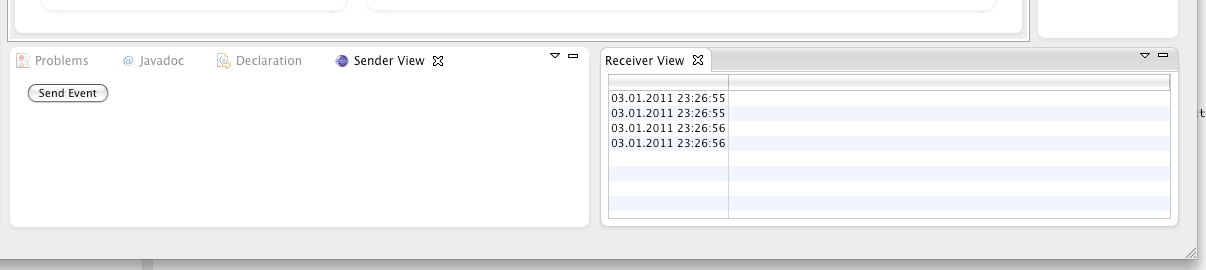 Not too complex but is it possible in fewer lines or in other words without the many lines of glue code? Then stay tuned for a follow blog entry on how e4 provides easy access to the EventAdmin-Service or visit my Eclipse 2011 talk "Singlesourcing for Eclipse 4.x and Eclipse 3.x" where you'll learn to apply the Eclipse 4.0 style to your 3.x applications.