Blog
My recommended project structure for (JavaFX) e4 projects
One of the most important things developing OSGi applications is the bundle structure and because e4 applications are by definition OSGi applications. Before looking in detail on e4 applications let's look at how you should structure your OSGi projects in my opinion. The main objectives are decoupeling and minimal dependencies so my suggest is to split up your project in 3 layers:
- Application layer
- Framework layer
- Build and Assembly layer
The application layer
- (Optional)my.project.${subcomponent}.core.model
This bundle holds your domain model or DTOs - my.project.${subcomponent}.core.services:
This bundle holds the none UI service interfaces e.g. to communicate with your application server or your persitence layer - my.project.${subcomponent}.core.services.mock:
This bundle holds mock implementations for your service interfaces you use while developing - my.project.${subcomponent}.core.services.${name}
This bundle holds your production implementations for your services - my.project.${subcomponent}.core.services.junit
This bundle holds your JUnit-Compatibility Test-Suite. It's purpose is to ensure that the different service implementation act like described in your API - my.project.${subcomponent}.core.services.${name}.junit
This bundle holds JUnit-Tests who test specific of this very service implementation - (Optional)my.project.ui.views.services
This bundle holds UI services you want use but are normally provided through the framework. A good example is publishing a selection but because you don't want to add framework dependencies in your application layer you abstract them away through service definitions - my.project.${subcomponent}.ui.views
This is the bundle where you implement your UI elements. It should only depend on:- the widget technology you use (=javafx)
- javax.inject and javax.annotation so that you can make use of DI
- my.project.${subcomponent}.core.model
- my.project.${subcomponent}.core.services
- my.project.ui.views.servicesIMPORTANT: Do not add dependencies on application frameworks here
Framework integration layer
- my.project.ui.app
This bundle holds the main application configuration. In e4 you will have here only your Application.e4xmi where you set up your main application structure, including e.g. the window structure, application commands like Quit, ... - (Optional)my.project.ui.views.services.${appframework}
This bundle holds the implementation of ui services for the application framework you want to plug into - my.project.${subcomponent}.ui.views.${appframework}
This bundle holds the integration code of your plain UI-Components into your application framework of choice
Build and Assembly layer
I'm using maven-tycho to build my MANIFEST first OSGi applications but I think other build system (buckminster) would have no problem with the below structure
- my.project.${subcomponent}.feature
This feature holds all bundles of this subcomponent - my.project.ui.app.jemmy
This bundle holds the Jemmy-UI-tests for your application - my.project.ui.app.product
In this bundle you find the .product-definition for your final application which is based upon feature - my.project.ui.app.releng
In this bundle you have your main release engeneering project which most likely only holds a pom.xml where you configured the p2-repos to use, ...
To give you an example how this would look like I started coding a sample setup as part of the e(fx)clispe repo. Check out the projects starting with "at.bestsolution.efxclipse.demo.twitter". 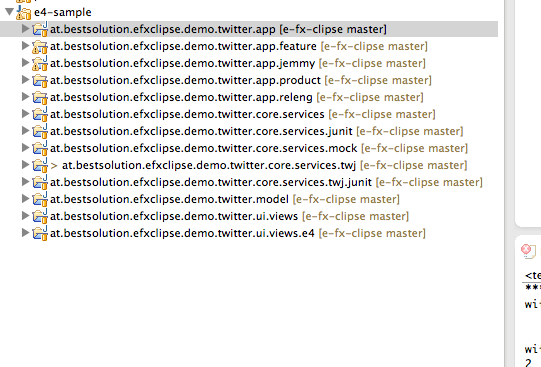 It is not yet ready to be consumed but we'll go forward with it in the next days.