Blog
e(fx)clipse 2.1.0 released
I'm happy to announce that e(fx)clipse 2.1.0 has been released today and it has a heap of new features and bugfixes (in total 49 tickets have been resolved).
The project
Starting with this release I'd like to publicly document the amount of time we spend on the project. For this 2.1.0 we spend ~150 work hours and another ~60 private hours. So if you appreciate all this we certainly welcome all donations. In the next release cycle we'll also setup bug bounties for often requested features like Min/Max support or detach through DnD. In case you miss something don't be shy get in touch with us.
Where do you get it
- Tooling:
- p2-Repository - http://download.eclipse.org/efxclipse/updates-released/2.1.0/site
- All-In-One Build - http://efxclipse.bestsolution.at/install.html
- Runtime:
- p2 repository - http://download.eclipse.org/efxclipse/runtime-released/2.1.0/site and http://download.eclipse.org/efxclipse/runtime-released/2.1.0/site_assembly.zip
- R5 repository (eg for usage with bnd/bndtools) - http://download.eclipse.org/efxclipse/runtime-released/2.1.0/bindex-repository.zip
- maven central (only parts of the runtime) under the group-id
at.bestsolution.eclipse
Core libraries published on maven central
As many of our components don't require to run in an OSGi-Environment and can be used in any application we started to publish them on maven-central.
- Eclipse Platform
- com.ibm.icu.base
- org.eclipse.e4.core.di.annotations
- org.eclipse.equinox.common
- org.eclipse.jdt.annotation
- e(fx)clipse
- org.eclipse.text
- org.eclipse.fx.core
- org.eclipse.fx.ui.panes
- org.eclipse.fx.ui.animation
- org.eclipse.fx.ui.controls
- org.eclipse.fx.core.di
- org.eclipse.fx.text
- org.eclipse.fx.text.ui
- org.eclipse.fx.code.editor
- org.eclipse.fx.code.editor.fx
Smart Code editing
If you follow this blog regularly it should not be a surprise that one of the main working areas has been to extract components from our research projects and make them available as loosely coupled components allowing one to implement code editors in a very simple way (nothing is bound to OSGi and e4!). 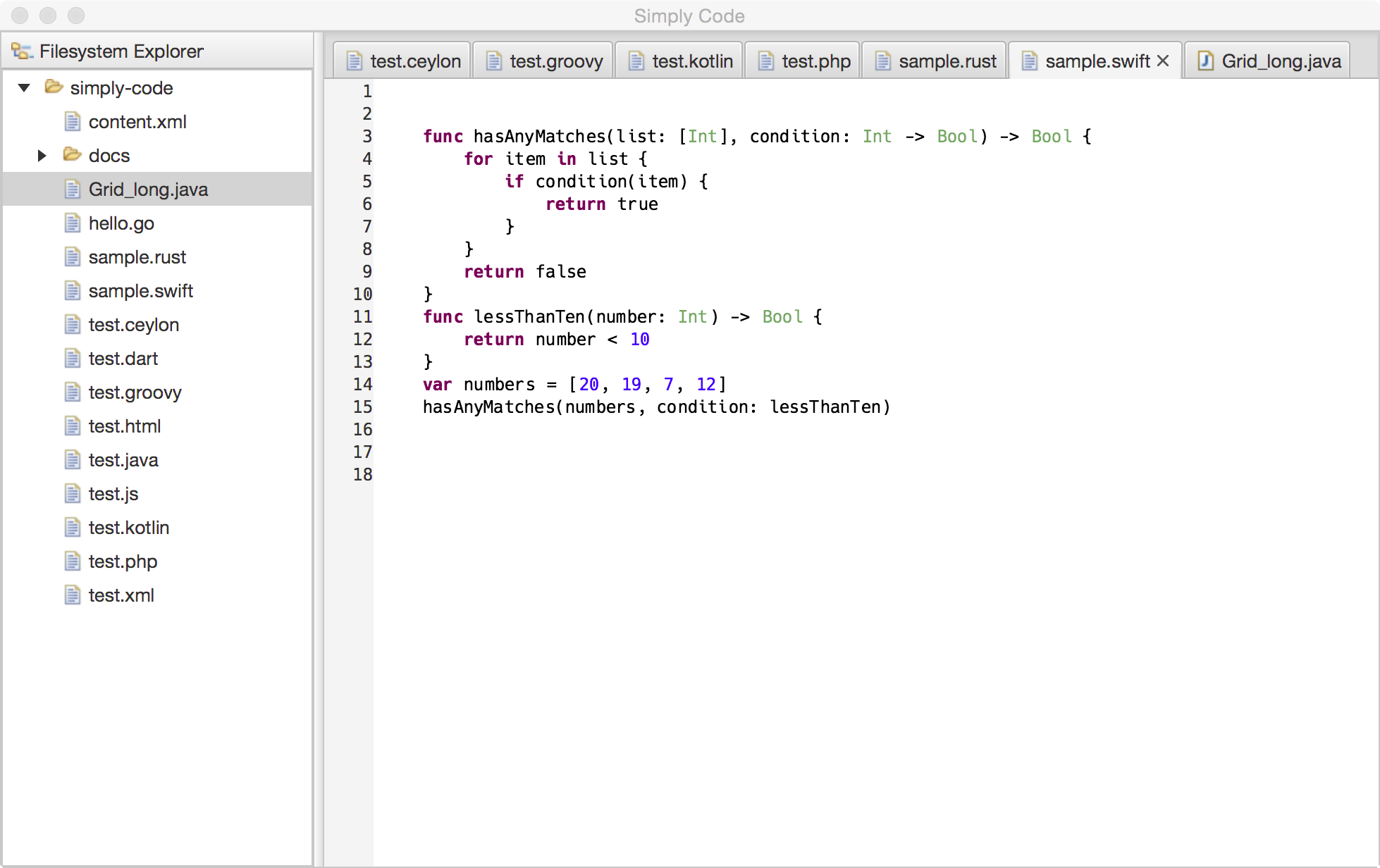 We ship lexical highlighters you can use in your own applications for the following languages by default:
- go
- dart
- groovy
- java
- js
- kotlin
- php
- python
- rust
- swift
- xml
In case you are interested in using the APIs there's a series of blogs who introduce the APIs and the tooling who makes it very easy for you to develop an editor for your favorite language or DSL:
- Defining source editors with a DSL
- Developing a source code editor in JavaFX (without e4 and OSGi)
- Developing a source code editor in JavaFX (on the Eclipse 4 Application Platform)
- Access Dart Analysis Server from Java
and more blogs on this topic will follow soon. Finally it is important to understand that all the code editing APIs are declared as provisional because we need to get feedback from adopters and maybe adjust them here and there.
New APIs
There's a bunch of new APIs available and I won't describe all of them but the most interesting are:
@Preference / Value
While there's a preference annotation in the e4 platform we ship our own one because the current implementation available from the platform is not working the way we expect you to develop components (hint: we expect you to write components without any dependency on OSGi and eclipse platform APIs). Usage is straight forward:
import org.eclipse.fx.core.preferences.Preference;
import org.eclipse.fx.core.preferences.Value;

class MyComponent {
  @Inject
  @Preference(key="myStringPrefValue")
  Value<String> sValue;

  @Inject
  @Preference(key="myIntegerPrefValue")
  Value<Integer> iValue;
}
And because the the annotation can make use of the adapter services who are part of the core platform you can exchange Value through javafx.beans.property.Property<T>. Read more at the wiki.
EventBus
A similar problem you face with publishing preferences or context values is to publish informations on the IEventBroker who has a compile time dependency on the OSGi-Event-Interface. Starting with 2.1.0 we provide our own simple EventBus-API you can use instead of the IEventBroker when publishing events. In an e4 application we simply wrap the IEventBroker and none OSGi users we provide a default implementation org.eclipse.fx.core.event.SimpleEventBus. Usage is straight forward
import static org.eclipse.fx.core.event.EventBus.data;

class MyComponent {
  private final EventBus bus;

  @Inject
  public MyComponent(EventBus bus) {
    this.bus = bus;
    this.bus.subscribe( "my/app/config/changed",
      e -> { handleConfigChange(e.getData()) } );
    // or for the cool kids
    this.bus.subscribe( "my/app/config/changed",
      data(this::handleConfigChange) );
  }

  public void publishSelection(Person p) {
    bus.publish("my/app/person/changed", p, true);
  }

  public void handleConfigChange(Config c) {
    // ...
  }

}
Adornment Graphics Node
While a similar API has been / is available as part of the e(fx)clipse e4 APIs we introduce in 2.1.0 a very similar on as part of our controls component so it can be used by none OSGi applications as well. For those who ask themselves what adornments are good for the following screenshot of the dart code editor might help 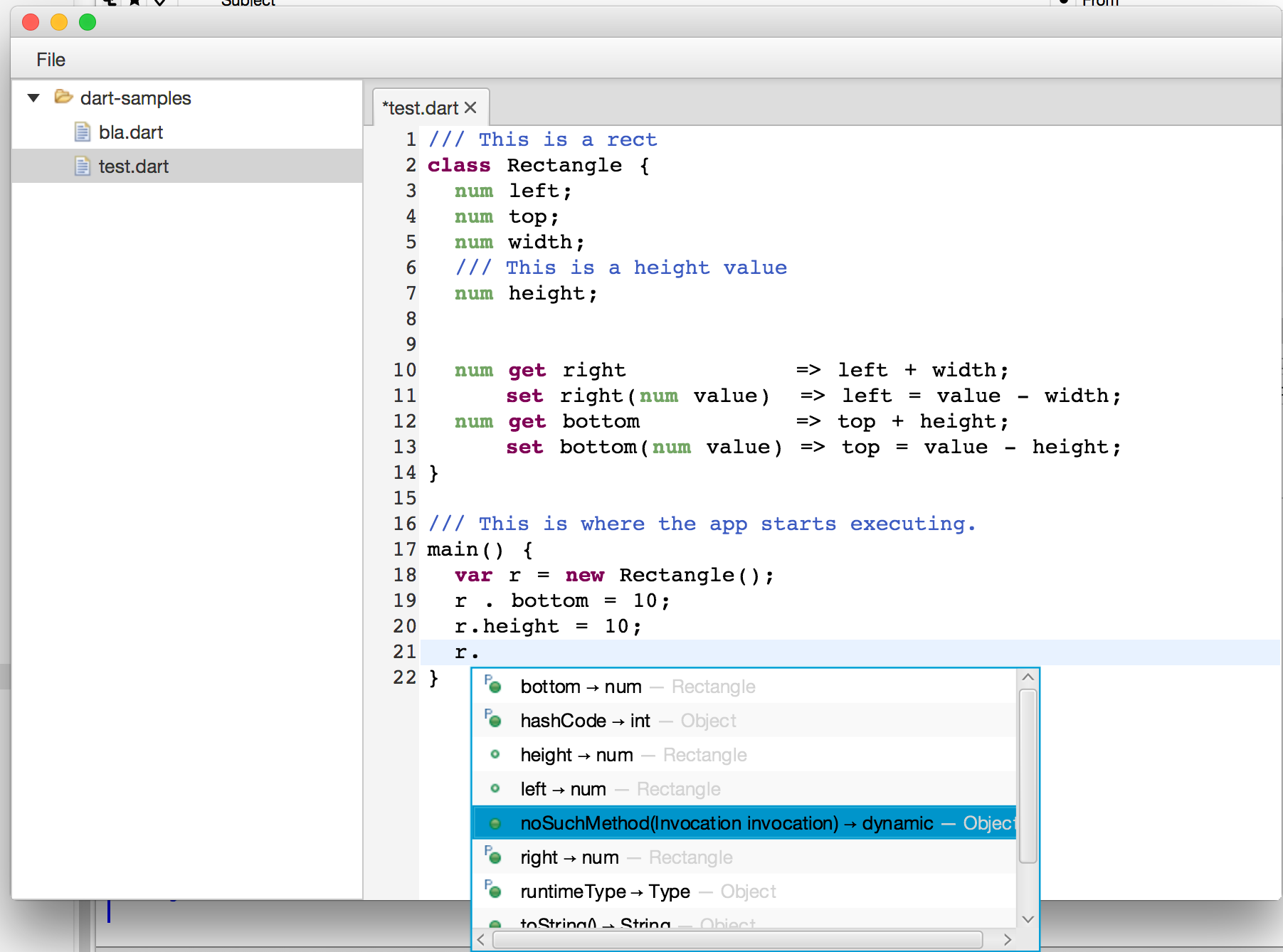 The graphics shown in next to the bottom entry is not a single image but made up from


Usage is straight forward:
Image b = new Image(getClass().getResource("methpub_obj.png").toExternalForm());
Image p = new Image(getClass().getResource("property.png").toExternalForm());

AdornedGraphicNode node = new AdornedGraphicNode( b,
  Adornment.create(Location.LEFT_TOP, p) );